
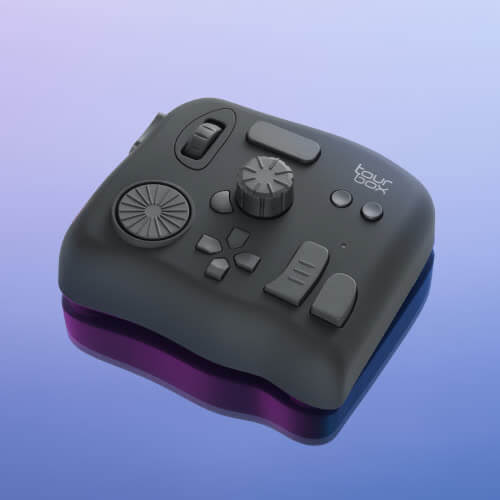
Your left hand is tired of being a Ctrl-holding intern. The TourBox NEO is the palm-sized console that turns that intern into a colorist: a dial, a knob, a scroll wheel, uniquely shaped buttons, and a USB-C cable. Street price sits around $150-$169.
This is TourBox’s value model. Same layout philosophy as the fancier Elites, minus Bluetooth, haptics, and iPad daydreams. You plug it in, map it, and stop hunting for bracket keys.
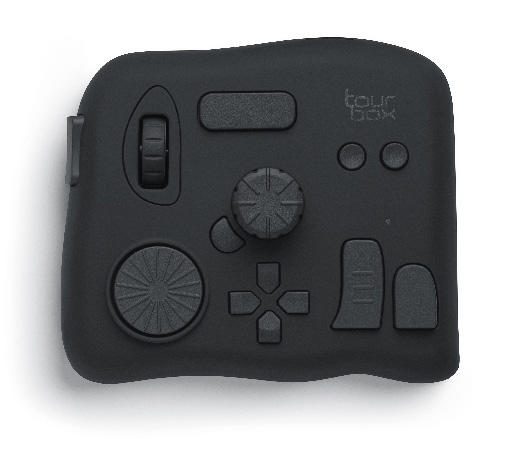
Knobs, macros, and the software that makes it real
Hardware is about 116 x 101 x 44 mm, 370g, PC+ABS shell, USB-C powered. There are 11 buttons plus 3 rotary controls, all different shapes so you can drive it without looking. Windows 7+ and macOS 10.11+. Not Linux or a tablet.
The brain is TourBox Console. Presets cover Photoshop, Lightroom, Premiere, and community maps for Clip Studio Paint, Capture One, DaVinci Resolve, Final Cut, Illustrator, Blender, and more. Auto Switch loads the right map when you change apps.
- Photo: culling and Lightroom sliders
- Draw: brush size, opacity, flow, canvas rotate
- Video: timeline scrub, cut, and grade
- Cable: included USB-C; no charging or pairing
If you wanted wireless, TourBox upsells Elite. If you wanted iPad, Elite Plus. NEO is the desk-and-plugs model.
Who should park a TourBox next to the tablet
We have a soft spot for left-hand shortcut bricks. The old custom Photoshop toolbar keyboard had the same itch: knobs for hue and brush size, keys for undo, fewer menu trips. TourBox NEO is that instinct with better sculpting and creative-app maps.
Buy it if you color-grade, retouch, or draw for hours. Skip it if you need Bluetooth, iPad, or Linux, or if you will never build a preset. Wired is the feature: zero latency, zero battery anxiety.
TourBox NEO editing controller — about $150-$169.
